Workspace
The interface
Editing programs all look a bit different but most have the same basic elements:
- A browser, where you store your clips (sometimes called library)
- A timeline, on which you cut the film
- A monitor, so you can watch how your film is shaping up
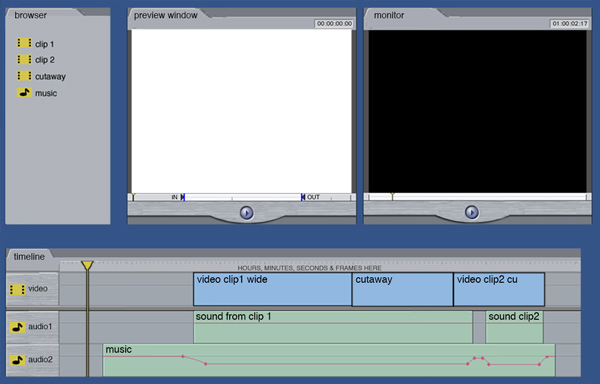
Most advanced programs have another 'preview' window to view clips before you put them on the timeline. This is useful, but can be confusing because it's easy to forget that you are watching an unedited clip that is not on your timeline yet.
The browser
Every clip you use in your film (shots, graphics, sound effects and music) - are stored and managed in the 'browser'. When you've decided where the clip goes in your film, you put it into your timeline and create a sequence.
The timeline
The timeline has separate video and audio tracks. It is arranged to show what order your clips are in your sequence and shows cut points and any transitions or effects. It gives a timing to your film too, so you can jump to anywhere in the sequence.
The playhead
There is a vertical line on the timeline that moves along when you press play. This is called the playhead and it shows you where you are in the movie. You can click to move this to wherever you want to be. You can also zoom in and out for detail. The scroll bar underneath represents the whole movie and shows you which bit you are working on.
The monitor
The monitor plays back what is on your timeline. You can also play back the clips from your browser.